
Merac hosts many customers' databases, but if you host your own database, here are some tips on
Databases maintenance best practices which will help to make sure that you don't experience performance issues (e.g. slow reports) caused by a lack of database maintenance.
Merac uses Microsoft SQL Server for it’s database which is a transactional database with a lot of data is written to it and updated on it. To prevent issues when retrieving data it is very important to keep the database healthy using a scheduled maintenance plan in SQL server. The following points are advised to address this:
Perform data integrity checks
Regularly checking the consistency of your databases helps ensure data integrity. SQL Server provides commands such as DBCC CHECKDB to detect and repair integrity issues in the database.
Maintain indexes
Indexes are crucial for query performance. Over time, indexes can become fragmented, leading to decreased performance. SQL Server provides maintenance tasks such as rebuilding or reorganizing indexes to optimize their performance. Regular index maintenance should be scheduled to keep your database running efficiently.
Update statistics
SQL Server uses statistics to generate optimal query execution plans. Outdated or inaccurate statistics can lead to suboptimal query performance. SQL Server automatically updates statistics, but in some cases, manual updates may be necessary, especially on large tables or after significant data changes.
Monitor disk space and clean up data
Monitoring disk space is critical to prevent data loss and maintain database performance. Regularly check disk space usage on the server hosting your SQL Server databases and ensure that you have adequate space for backup files, transaction logs and database growth. Implement data archiving and cleanup processes to remove obsolete or unnecessary data from databases.
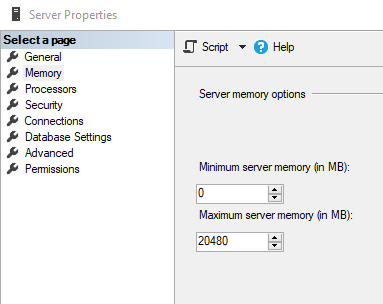
Restrict Memory Usage
You might want to limit the amount of memory which SQL Server uses on a machine because if it's allowed to use all memory, this can have adverse effects.
Back up databases and transaction logs
It’s important to take regular backups and test them periodically. Be sure to follow retention policies for backup files.
Is your Database on a Fit-For-Purpose Server?
If the above tips do not solve the issue, please check if your server is up to date enough (i.e .not more than 5 years old), and is it hosting anything else?
Is your server running one of the supported versions of Windows - see What Operating Systems is the Merac Back Office Supported On?
Do you need help with this?
If this all seems too technical and you need help, we can host your database for you, but we can also remotely manage your database running on your own server.
- For more information on hosting, please contact your customer success manager.
- For more information on Merac helping you manage your database, please see the options in Merac Database Optimisation and Maintenance Plan.