
If you carry out a Stock Adjustment (via Setup > Stock > Stock Adjustments) and then someone checks the stock holding quantity of that stock item (for the specific 'Stock Location') and it did not change, it is most likely due to a setting on the relevant 'Stock Item'.
Go into Setup > Stock > Stock Index and search for the relevant Stock Item in the usual way, then double click the stock item in question. This will show the 'Stock Maintenance' screen (see below example) for this 'Stock Item'.
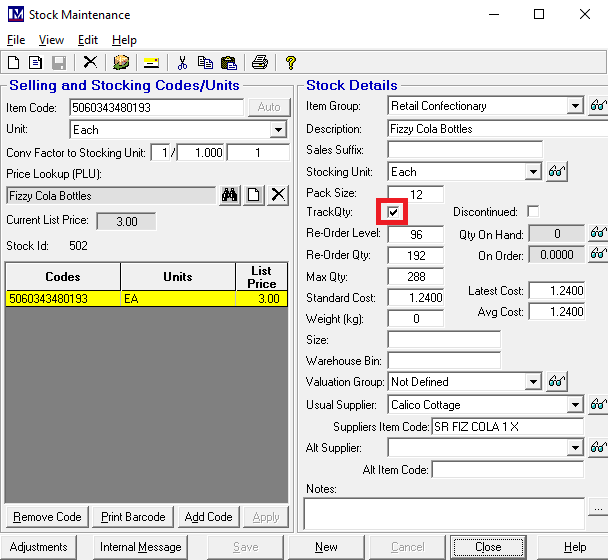
If stock movements are not being recorded for this 'Stock Item', it is likely that the tick box to the right of the text 'Track Qty:' is unticked. Click in the box so that it becomes ticked. The 'Save' button at the bottom of this screen can now be clicked to save the changes.
This should now resolve the issue where the stock levels were not being deducted when a 'Stock Adjustment' was processed for this 'Stock Item'.